



Documentation
Pick up where the work actually left off. mcue saves what happened, what you decided, and what comes next as an explicit work record. A fresh connected AI chat reads that record and continues, without rebuilding the context from scratch. You can inspect the record, correct it, and choose which clients may change it.
Getting started
Start with your existing conversation: save where you are, open a fresh chat and carry on. Your first useful continuation comes before the deeper lessons. There are two ways in, and they share the same record:
- In the browser, with Hub. Create a project, connect your AI app, and it can read and save straight away. Nothing to install. Hub is in invite-only alpha.
- On your machine, with the CLI. The same loop runs locally, offline, in files you can read. Connect it to Hub later if you want the record reachable from other apps and machines.
Request alpha accessRead Getting started
Start with the loop
Every session follows the same loop: save where the work stands, check the record, and resume from it in the next session. Everything else in these docs exists to support it.
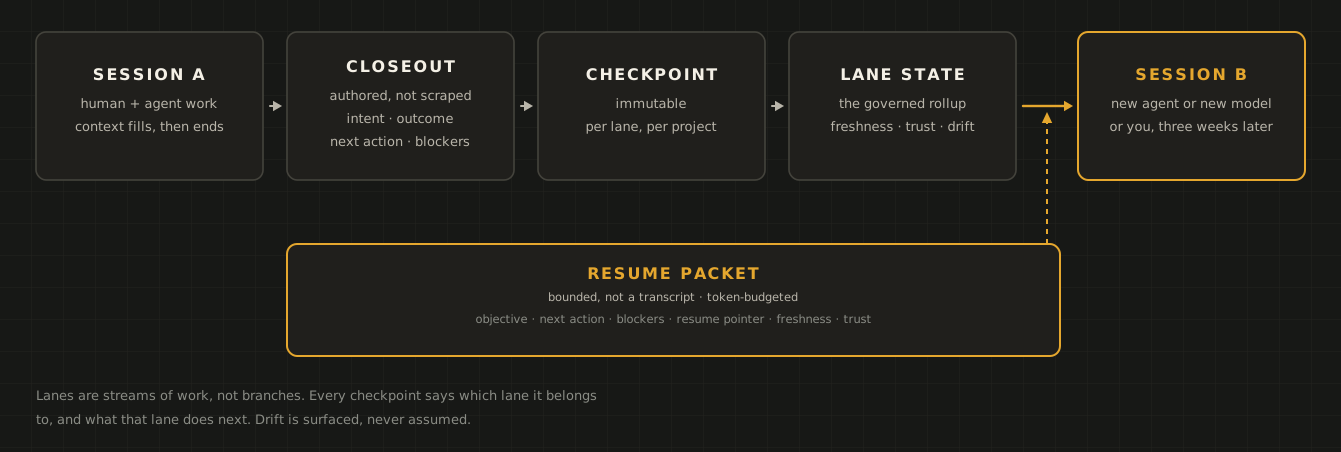
In a connected chat, you ask your AI app to save or resume the project. In the terminal, the same loop is four commands:
mcue init payments-api --name "Payments API"        # register a project, anchored to this directory
mcue closeout payments-api    # capture intent, outcome, blockers, next action
mcue resume payments-api      # re-enter with a bounded context packet
mcue index                    # see the whole portfolio at a glance
None of those touch the network. Locally, mcue works without an account.
What mcue owns, and what it does not
mcue holds operating state: the intent, outcomes, blockers, decisions, and resume points that let the work continue. Your source code stays in Git, untouched — mcue never writes to your repository and never copies it anywhere.
That boundary is the reason the rest of the design looks the way it does, so it is worth reading Operating state before the reference material.
Where to go next
How these docs are arranged
Getting started
Continue real work in a fresh chat, then explore plans, Hub and local setup.
- Getting started — Save and resume your work, use plans and the Hub, and follow examples for writing, research and software.
- What mcue can do — The complete feature map: local operating state, agents, Hub, BYO-S3 sync, and every CLI namespace.
- Install — Install the CLI with your alpha download key, and confirm it with mcue doctor.
- Quickstart — Register a project, close out a session, and resume with bounded context.
Guides
Task-shaped walkthroughs for the things you will actually do.
- Close out and resume — The two commands the whole product is built around, and how to write a closeout worth resuming from.
- A week with mcue — One project, three closeouts, one interruption, and the resume that pays for all of it — every command and its real output.
- Give agents your state — Run the local MCP server and connect a client so agents read the same state you do.
- Publish to Hub — Log in, publish a project, and connect the hosted MCP endpoint.
- Read continuity graphs — Follow projects into their lanes, then read the cadence and coverage of accepted closeouts.
- Work offline and sync — What happens when a machine is offline, and how pending work reconciles on reconnect.
- Recover a broken session — Interrupted closeouts, degraded checkpoints, and retroactive capture.
Concepts
The model underneath the commands. Read these once and the rest follows.
- Operating state — The boundary between what mcue owns and what Git owns.
- Why not a notes file? — The obvious objection, answered without hedging — including the cases where a plain notes file really is the right answer.
- Projects, lanes, and plans — How work is partitioned, and why a lane is not a branch.
- Authority and conflicts — Sequences, pending operations, divergence, and why there is no last-write-wins.
Reference
Complete surfaces, kept in step with the shipped binary.
- CLI commands — Every command, grouped by namespace.
- Files on disk — What lives under $MCUE_HOME and the shape of each file.
- MCP tools — The tool surface exposed to agents, locally and through Hub.
A note on versions
These pages track the current release. The command surface is generated from the
shipped binary rather than transcribed, so if a flag here disagrees with
mcue <command> --help, trust the binary.